Chain Bridge

Contents
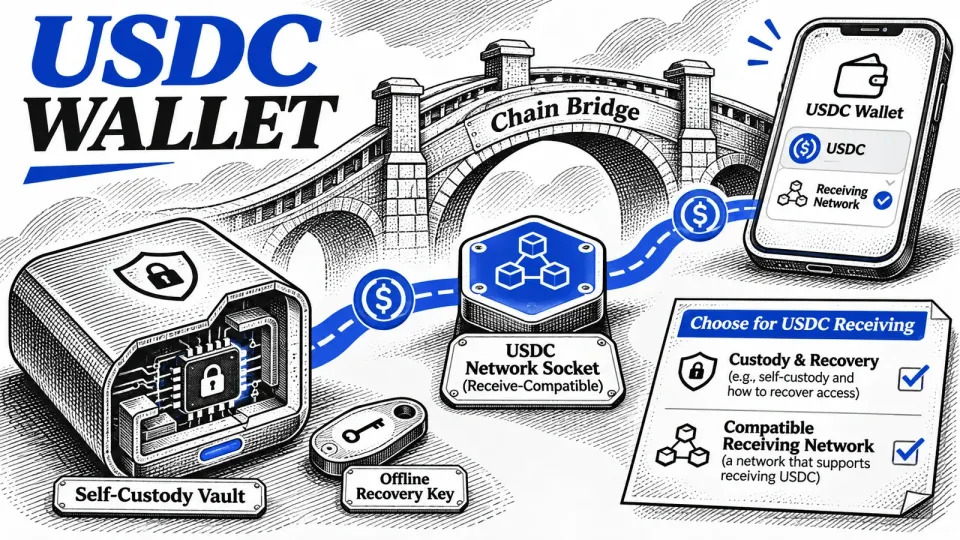
Choose a USDC wallet that supports the exact network you'll use and gives you a recovery method you can protect. For everyday transfers, I'd start with a self-custody software wallet; for a balance you intend to leave untouched, I'd consider a compatible hardware wallet. An exchange account can be convenient for trading, but the exchange controls withdrawals and holds the keys. The best choice is the one that can receive your USDC, recover access after a lost device and pay for the next transfer.
A “USDC supported” badge is only the start. Before moving money, check the token on its particular blockchain and the route to your eventual recipient. A wallet with more listed assets isn't automatically a better fit for that route.
Choose who controls the keys
A self-custody wallet gives you control of the credentials used to authorize transactions. A custodial exchange manages those credentials for your account. I'd choose self-custody when direct control is the priority and I'm prepared to secure recovery; I'd use a custodial account for a trading task only after checking its withdrawal conditions.
| Approach | When I'd consider it | What must be ready |
|---|---|---|
| Self-custody software wallet | Regular receiving, sending or supported app use. | The exact USDC network, a protected recovery method and a way to pay transaction fees. |
| Hardware wallet with compatible software | Holding a balance while reducing exposure of the signing keys to an internet-connected device. | Device and software support for the network and token, secure recovery and careful approval of transactions. |
| Custodial exchange account | Buying or trading where you accept the provider's control over access and withdrawals. | Account eligibility, account recovery, and the recipient's USDC network in the exchange's withdrawal list. |
Keep product names separate from custody. Kraken Wallet describes a self-custody app, while the same page separately offers services on Kraken's exchange. An exchange login and a self-custody wallet aren't interchangeable recovery methods. Read the terms of the specific product you're opening.
For an EVM route, MetaMask is a practical software-wallet candidate because its official guidance covers receiving tokens and connecting hardware wallets. Trust Wallet also offers a self-custody USDC wallet. Its app is free to download and install, but transactions can still incur network fees. I'd narrow either choice using the required network and recovery setup rather than treating a download rating as a security test.
MetaMask's hardware-wallet guide lists Ledger and Trezor among its extension integrations and explains that a connected device approves transactions. Mobile integrations differ, so check the specific device and platform before buying. Connecting hardware doesn't make a recovery phrase safe to disclose, and it doesn't make a malicious transaction safe to approve.
Match the USDC network and token
Write down where the USDC is now and where it needs to go. Then check both ends of that route. Circle's contract directory identifies native USDC by network; Ethereum, Base and Polygon have separate entries. A wallet must support the chain and the particular token, while a receiving service must explicitly accept that deposit.
A token contract identifies the asset. Your wallet's receiving address identifies the account that should receive it. Don't paste the USDC contract into the destination field. An address beginning with 0x doesn't by itself prove that an exchange will credit USDC on Base or any other EVM chain.
Also distinguish native USDC from a bridged representation such as USDC.e. Matching a ticker or logo isn't enough. I wouldn't change networks just because a different chain looks cheaper until the sender, wallet and eventual recipient all support the resulting asset.
For example, a wallet capable of receiving USDC on Base doesn't make an Ethereum-only service deposit compatible with Base. Switching the selected network changes the wallet's view; it doesn't move the balance between chains. The USDC on Base guide covers that network's receiving and transfer checks. Choose a cross-chain route only when you need to move between networks.
Secure recovery before funding the wallet
Install through the wallet developer's official download links, then understand how the setup you've chosen restores access on a replacement device. For a phrase-based wallet, protect the recovery phrase before receiving funds. Never send it to support, type it into a token-verification website or include it in a screenshot you share.
MetaMask's recovery guidance distinguishes two setups. With a Secret Recovery Phrase setup, the password unlocks that device; the phrase restores the wallet. With its Google, Apple or Telegram setup, both that account and the MetaMask password are needed to access the backed-up recovery material. Losing either can prevent recovery unless you've separately revealed and secured the phrase. Choose the arrangement whose required credentials you can keep available and private.
For a new hardware setup, MetaMask recommends generating a new recovery phrase on the hardware device, connecting its accounts through the supported hardware-wallet flow, then transferring assets to those accounts. Importing an existing software-wallet phrase into hardware doesn't undo its previous exposure. Keep the device's recovery material out of ordinary software forms. I'd keep a holding account separate from an account used to connect to unfamiliar apps, because fewer interactions make its approvals easier to scrutinize.
Self-custody doesn't remove restrictions in the token itself. Circle's USDC terms for holders outside the EEA reserve address-blocking rights. A hardware device protects signing credentials; it doesn't override the issuer's rules. Don't choose a wallet on a promise that cold storage makes USDC immune to blocking.
Check how the next transfer will pay its fee
Receiving a balance and being able to send it are different checks. For an ordinary token transfer, plan for the network's fee asset on that same chain. ETH on Ethereum doesn't fund an ordinary transaction on Base. Check the wallet's current estimate rather than funding a fixed gas amount from an old recommendation.
Some wallets can instead collect the fee in an eligible token. MetaMask's gas-included transactions support USDC as a fee option on Ethereum, Base and several other listed networks. The guide requires Smart Transactions and Estimate balance changes to be enabled. The confirmation screen lists the available fee tokens and estimates, including a small MetaMask fee.
Trust Wallet's FlexGas guidance also lists USDC among its supported fee tokens, with network and action restrictions. The chosen fee token must be at the same address used for the transaction. These features change how you pay the fee; they don't mean every USDC transfer is free or supported without a native-token balance.
Before relying on either feature, check that it is offered for your actual account, network and transaction. If it isn't, arrange the native fee asset on that chain or choose a supported funding route. I'd resolve this while selecting the wallet, so the first received balance can also be used.
Check the receiving address before the first transfer
Once custody, recovery and fee payment are settled, follow the wallet's receive instructions for the network you chose. MetaMask's token-deposit guide explains that clicking the public address in the extension copies it for the sender. The address is public; the recovery phrase and private keys must remain secret.
- Select the intended account and network in the receiving wallet. Verify the supported USDC token against the issuer's listing.
- Copy the receiving address through the wallet's own interface. Check the full pasted address against the full address shown in account details; the shortened label alone isn't enough.
- On the sending platform, select the same USDC network. Review its fee and the amount to arrive. For a service deposit, follow any minimum and additional deposit instructions it supplies.
- When the extra fee is acceptable and the amount meets any deposit minimum, send a small first transfer. Wait until the recipient credits it, then confirm the network, token and balance before deciding on the rest.

A confirmed blockchain transaction and a credited exchange deposit are separate results. If an exchange hasn't credited a transfer, check its deposit instructions and contact official support with the transaction reference. Don't fund a supposed recovery service or disclose wallet secrets to make a missing balance appear.
The USDC network guides help check a particular chain's receiving and transfer requirements. If your next destination requires a different network, use the bridges and tokens hub to choose a supported route before moving the balance.