Chain Bridge

Contents
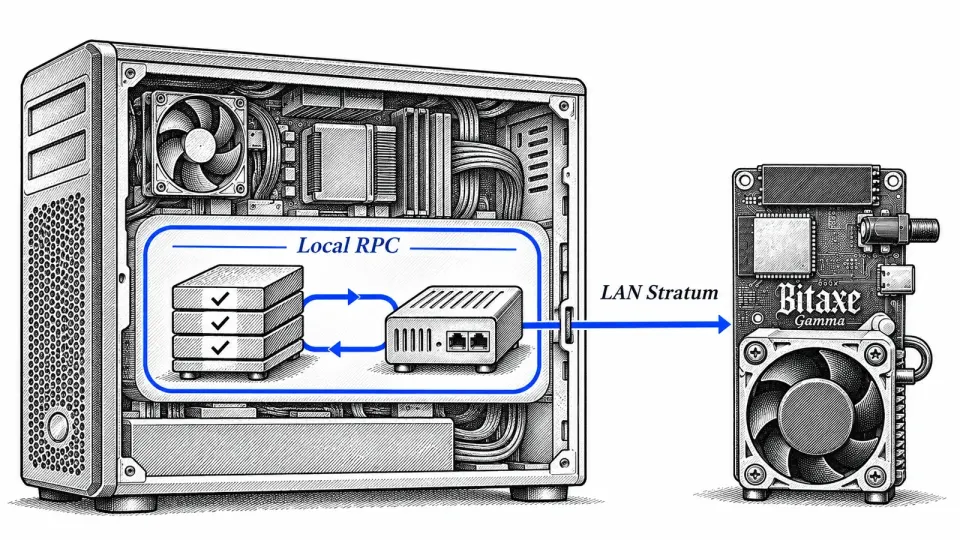
Connect Public Pool to Bitcoin Core's local RPC interface, then connect the miner to Public Pool's Stratum listener. When both programs run directly on the same Windows PC, the backend uses 127.0.0.1:8332; a separate miner uses the PC's actual LAN address and Stratum port. I'd keep that two-hop arrangement local and check the Public Pool version before copying an old Windows guide.
This route is for a native Windows Bitcoin Core node, a separately running Public Pool backend and an ASIC on the same trusted home network. Docker, WSL and Umbrel have different network boundaries. In particular, Umbrel's documented app port isn't a substitute for the native backend's configured port.
Give the backend and miner different addresses
Bitcoin Core supplies block templates and accepts candidate-block submissions through RPC. Public Pool translates that work into the Stratum protocol used by the miner. Entering the node's RPC port into a Bitaxe pool field leaves out that translation service.
Scroll sideways on a phone to read every column.
| Connection | Same-PC example | Where it belongs |
|---|---|---|
| Pool backend → Core | http://127.0.0.1 with RPC port 8332 | Public Pool's private node-connection settings |
| LAN miner → pool | 192.168.1.50 with Stratum port 3333 | Miner's pool host and port; replace the example IP |
| Local browser → backend API | http://127.0.0.1:3334/api/info | A backend check, not a Stratum address or a complete dashboard |
The backend's example configuration separates RPC, Stratum and API ports. These examples use mainnet RPC 8332, Stratum 3333 and API 3334. If you deliberately change a listener, update the corresponding client too. Bitcoin's peer-to-peer port 8333 has a different job.
On a miner, 127.0.0.1 means the miner itself. Find the Windows PC's active Ethernet or Wi-Fi IPv4 address with ipconfig or your router's device list. Ignore unrelated VPN and virtual adapters. Reserve the PC's address in the router if you want it to remain stable.
Check the old Windows app before installing it
The desktop app 1.0.1 release is from July 2024. Its installer and the separately maintained server repository are different artifacts. A fix in the server's current source doesn't update an executable already installed on your PC.
Two published Windows reports show why reaching a dashboard isn't enough. In one Windows 11 Pro 24H2 report, Core 27.2 and app 1.0.1 served two Bitaxe Gamma clients before repeated backend exits; the attached logs include template timeouts and a work-queue error. In a separate Windows 11 report, a fully synchronized Core 28.1 node and app 1.0.1 produced “jsonrpc field must be a string.” The reporter later said switching to Knots worked, without specifying the Knots version.
These are individual configurations, not an uptime percentage or evidence that every Windows node fails. The useful distinction is between a transport problem, an RPC-format mismatch and a process that stops after connecting. In the first discussion, the maintainer recommends running the server and UI separately. I'd use the separately maintained backend for a new setup and resolve a protocol error there, rather than downgrade Core or widen its network access.
If you already use app 1.0.1, its Windows settings location is %APPDATA%\public-pool-app\settings.json, with values inside an env object. Its log is %APPDATA%\public-pool-app\logs\main.log. Close the app before editing and preserve a private copy. The server route below uses a plain .env file instead; pasting that file into JSON won't work.
Prepare Core without exposing RPC
Finish the Bitcoin Core setup and synchronization first. In Core's RPC console, getblockchaininfo should identify chain as main and initialblockdownload as false. Also check that the node remains connected and receives new blocks. The field definitions distinguish initial download from an already caught-up node.
Back up the existing bitcoin.conf before changing it, and preserve any wallet backups separately. Use the configuration file and data directory that this Core instance uses, especially if you selected another drive. Merge the relevant settings rather than replacing the whole file. For the same-PC mainnet arrangement, the connection settings are:
server=1

[main]
rpcbind=127.0.0.1
rpcallowip=127.0.0.1
rpcport=8332
If the file already has a [main] section, put the mainnet entries there and resolve conflicting values. Restart Core normally after saving. This limits RPC to the PC; it doesn't stop the separate Stratum listener from accepting your LAN miner. Core's RPC security guidance explicitly warns against public internet exposure.
For a pool running under the same Windows account, I'd use Core's authentication cookie. With no configured rpcpassword, Core generates a private .cookie file at startup. Give the backend its actual path, never the cookie's contents. Don't change file permissions to make it readable by everyone.
An existing setup may already use static RPC credentials for other applications. Preserve those dependencies. Either configure a deliberate cookie-based arrangement or supply that setup's private RPC username and password to the backend and leave its cookie-file setting empty. A miner needs neither credential, and no seed phrase belongs in either program's pool settings.
Before starting the pool, Core's console can request a template with getblocktemplate {"rules":["segwit"]}. A returned template confirms that the node can supply that work; a synchronization or connectivity error needs fixing at the node first. The template RPC documentation defines this request. It doesn't require importing a funded wallet or adding a transaction index merely to make this call.
Configure and start the separate backend
The server source used for this configuration declares Node.js 22.12.0 or newer and documents its install, build and start commands. Use a maintained Node release meeting that requirement and Git from their official distributions. The desktop installer's bundled runtime doesn't establish that the separate server's requirements are met.
Close the old desktop app if it's running, so it doesn't compete with the separate server for the same ports. Choose a working folder you control. In PowerShell, obtain the project and select the referenced source revision:
Scroll sideways in code blocks to read long lines on a phone.
git clone https://github.com/benjamin-wilson/public-pool.git
cd public-pool
git checkout 96a9202c11de2c6fc8d41155e2e779912a476dc7
npm install
Copy-Item .env.example .env
The project includes native dependencies, so a dependency-install failure is a build prerequisite to resolve before continuing. Follow the failing package's Windows requirements; don't disable security software or install unrelated mining tools to suppress the error. Keep the installation's post-install step enabled as documented by the project.
Edit .env in that folder. This example assumes Core and the server run directly on the same Windows PC under the same account. C:/BitcoinData/.cookie is only an example path: replace it with the actual cookie file for your running mainnet node.
BITCOIN_RPC_URL=http://127.0.0.1
BITCOIN_RPC_PORT=8332
BITCOIN_RPC_USER=
BITCOIN_RPC_PASSWORD=
BITCOIN_RPC_COOKIEFILE=C:/BitcoinData/.cookie
BITCOIN_RPC_TIMEOUT=10000
API_PORT=3334
STRATUM_PORT=3333
NETWORK=mainnet
API_SECURE=false
Use the cookie method or your deliberately configured static credentials. Don't leave a sample cookie path alongside credentials and expect the backend to ignore it: its RPC client reads a nonempty cookie-file setting first. Keep the file private and out of shared screenshots or repositories.
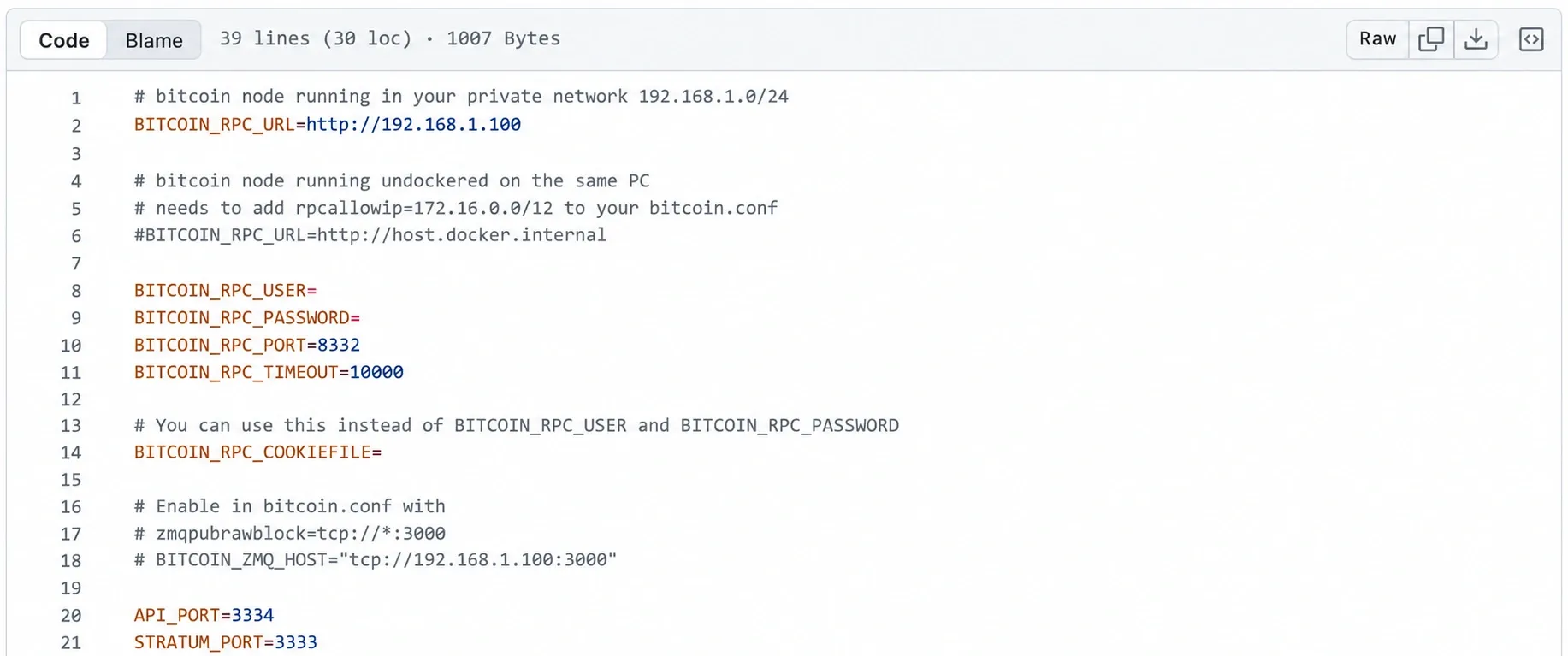
ZMQ is optional in this backend: it polls mining information when BITCOIN_ZMQ_HOST isn't set. Leave it unset for this first connection rather than copying a public 0.0.0.0 publisher from another guide. You can add a deliberately secured local block-notification feed later.
Before starting, review Windows Firewall rules for Node.js. This source binds its API to 0.0.0.0, so the loopback URL used in your browser doesn't make the listener private. Remove or narrow any broad inbound allow rule for this server process; keep API 3334 blocked from other devices. Allow only the required Stratum port from the miner's trusted address or subnet, as described below.
With Core running, build and start the backend from its project folder:
npm run build
npm run start:prod
Look for Bitcoin RPC connected, a block-height update and a Stratum-listening message for your configured port. Opening http://127.0.0.1:3334/api/info on that PC checks the backend API, which returns data rather than a complete graphical dashboard. The separate Public Pool UI project supplies that dashboard; its configuration is an additional step. The hosted public-pool website won't automatically show a local server's miners.
Point the LAN miner at the PC
Use a compatible Stratum V1 miner. In a form with separate host and port fields, enter the PC's actual LAN IP as the host and 3333 as the port for this configuration. If the firmware asks for one URI, the example is stratum+tcp://192.168.1.50:3333. Replace the IP; don't enter 8332, a browser dashboard URL or the public service's domain.
Set the mining username to your own valid mainnet Bitcoin receiving address, optionally followed by .worker1. Use the miner's documented pool-password field; x is a conventional placeholder here, not the Core RPC password. Confirm the receiving address belongs to your intended wallet before saving. The tiny ESP32 devices discussed in the NerdMiner pool guide have additional low-difficulty compatibility questions, so don't assume every such firmware behaves like an ASIC.
Allow incoming TCP on the configured Stratum port in Windows Firewall only for the trusted network and the miner's address or required local subnet. Keep RPC 8332 and the API 3334 inaccessible to other devices for this route. No router port-forward is needed for a same-LAN miner. A guest Wi-Fi network that isolates clients can prevent the connection even when both devices have internet access.
Both programs need to remain running. Closing a PowerShell session running the backend, closing the old desktop app or letting the PC sleep can stop work. Establish the connection first, then arrange a deliberate startup and supervision method. After Core restarts and rotates its cookie, restart the backend too: this client reads authentication during initialization.
Verify each hop before changing another setting
A useful check follows the work: Core supplies a current template, the backend accepts and authorizes the miner, and the miner receives jobs and submits accepted shares. A high local hashrate by itself doesn't prove that those shares reached your local pool. Check the worker on the local UI if configured, or the backend's /api/client/ route followed by your receiving address, without its worker suffix.
Scroll sideways to read the error checks on a phone.
| Observed result | Check next |
|---|---|
| RPC connection refused | Core is running with server enabled; loopback and RPC port match; configuration restart completed |
| RPC 401 or unreadable cookie file | Actual authentication method, cookie path/account permissions and backend restart after Core restart |
| jsonrpc field must be a string | Installed backend/app version and RPC request format; opening the firewall cannot repair a malformed request |
| EADDRINUSE on 3333 or 3334 | Another process already owns the listener; avoid running old app and separate server on the same ports |
| RPC works; miner cannot connect | PC LAN address, Stratum listener, scoped Windows Firewall rule and guest-network isolation |
| Timeout or work-queue error after startup | Core responsiveness, competing RPC load and backend logs; don't infer a wrong password from every timeout |
If you need support, retain the exact Core and pool versions, the failing hop and redacted logs. Keep cookie contents, passwords and wallet recovery material out of the report. A working local solo stack gives you control over the infrastructure; ordinary accepted shares still aren't proportional Bitcoin payments. Keep the two-hop connection working before adding a remote-access layer or changing the reward arrangement. The mining library and node guides cover those adjacent decisions.