Chain Bridge

Contents
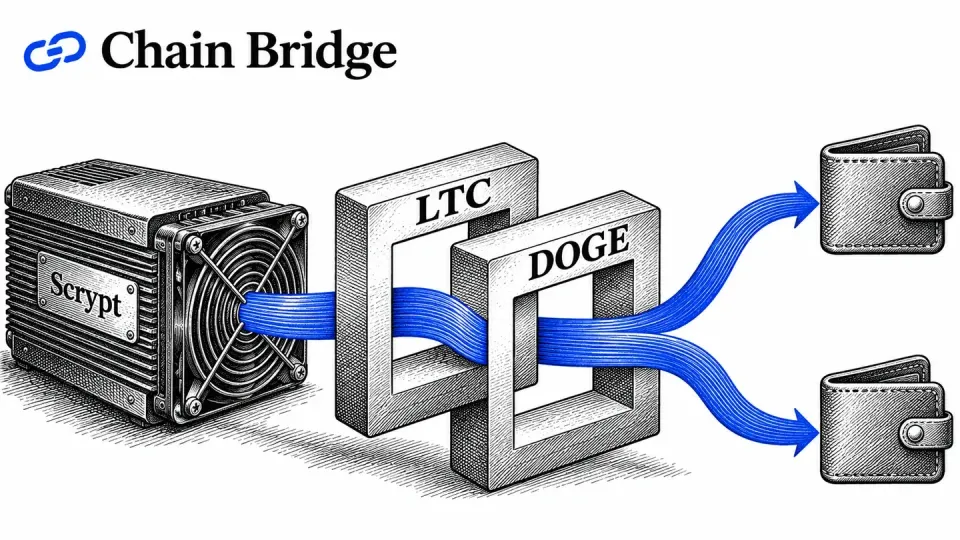
For a Scrypt ASIC, I'd start with a shared Litecoin pool that explicitly credits and pays Dogecoin alongside LTC. Confirm both receiving addresses and the DOGE reward rules before connecting: some pools forfeit merged-mining rewards until the corresponding address is active. If you're using a CPU or GPU service that pays in DOGE, check the network your work supports and the service's reward conversion.
Match the mining work to the coins you want to receive
Dogecoin uses Scrypt and supports merged mining with Litecoin. The Dogecoin project's mining guide explains that compatible miners can contribute to both networks with the same work. You don't need to divide an ASIC's operating time equally between two pool connections to enable this arrangement.
The pool operates the merged-mining infrastructure; its accounting rules determine the rewards credited to you. LitecoinPool's explanation distinguishes simultaneous merged mining from profit switching and says its miners need no special merged-mining configuration. That doesn't remove the separate wallet setup on the pool website.
Use a Scrypt-compatible miner. A Bitcoin SHA-256 ASIC or an ESP32 NerdMiner can't become a Litecoin/Dogecoin miner through a different server address. For sustained direct mining, assess a suitable ASIC's electrical supply, heat and noise before choosing the pool. Include electricity and cooling in your costs; receiving two assets doesn't make the equipment profitable by itself.
Compare coin rewards and payment conditions
These routes serve different goals. I'd favor a shared two-coin pool when the goal is LTC and DOGE receipts from your own Scrypt work. A DOGE conversion service is a different choice, and hosted solo mining requires a budget that can tolerate long periods without finding a block.
Focus the table and scroll sideways to read the reward and payment conditions.
| Route | Reward arrangement | Condition that changes the choice |
|---|---|---|
| LitecoinPool | LTC and DOGE under separate PPS accounting. PPS means pay per share. | Its FAQ specifies a nominal 2% PPS fee for each coin and no payout fee. Set both receiving addresses and inspect your Payments page's conditions. |
| f2pool LTC merged mining | LTC mining with DOGE rewards under PPLNS, or pay per last N shares. | The current support table lists a 4% LTC PPS fee and a 0.02 LTC threshold. The separate merged-mining guide lists a 40 DOGE threshold; DOGE rewards require an activated address. |
| unMineable DOGE payout | Scrypt mining or another supported algorithm can credit a DOGE payout balance. | The DOGE page lists the native Dogecoin network and a 30 DOGE minimum. A DOGE receiving balance doesn't establish that you're mining the Dogecoin network directly. |
| SoloPool DOGE | Hosted solo infrastructure with merged LTC/DOGE work and direct block rewards assigned to the miner. | The operator lists 10% LTC and 0% DOGE fees. Each miner operates independently; accepted shares don't entitle you to a slice of another miner's block. |
For f2pool, keep the LTC fee and threshold table beside its merged-coin payment rules. The LTC PPS method and DOGE PPLNS method describe different reward calculations. A daily payment schedule doesn't remove the threshold or make DOGE credits equally large each day.
For LitecoinPool, the two 2% fees apply to separate coin rewards. Adding them into a supposed 4% deduction from every reward would use the wrong basis. Its current FAQ also says other merge-mined coins support a higher PPS ratio rather than arrive as separate coin payments.
Older guides can describe a different arrangement. LitecoinPool's dual LTC+DOGE system announcement records the move to separate DOGE payments in February 2024. Use the current FAQ and your account's payment conditions for today's setup. The Dogecoin pool directory helps find candidates, but its displayed LitecoinPool and SoloPool fees differ from the operators' current pages. A directory row shouldn't settle the payment decision.
Activate the receiving addresses before sending work
Prepare separate LTC and DOGE receiving addresses for the correct native networks. I'd use reputable self-custodial wallets when practical because an exchange adds its own deposit minimum and address restrictions. Check the receiving service's rules before setting the pool's payout threshold; a pool can send an amount that an exchange won't credit.
For f2pool, this step is time-sensitive. Its LTC merged-mining support policy says rewards begin only after the relevant wallet address is successfully bound and activated. Without that address, the corresponding rewards are forfeited, don't accumulate and won't be reissued. Add DOGE before mining if DOGE rewards are part of your plan.
The documented web path is your account name, Account Settings, then Payout Settings beside the intended mining account. Choose LTC and enter the wallet address for the relevant merged coin. Verify that the saved DOGE address belongs to the intended account and has completed the required activation. The same guide directs you to the LTC Revenue page to inspect merged rewards.
On LitecoinPool, enter both a Litecoin address and a Dogecoin address in Account Settings. Its FAQ puts the exact payout conditions on your Payments page and says changing an address suspends payments to it for 24 hours. f2pool also holds payments after address changes; use the recovery time shown in its wallet settings rather than assume the LitecoinPool interval applies there.
Connect to the selected pool and verify the worker
Keep the pool server, worker login and receiving wallets separate. In LitecoinPool's documented account route, a US East Coast connection uses stratum+tcp://us.litecoinpool.org:3333. The default worker login is your_username.1 with worker password 1; replace the username with your pool username. Both credentials are case-sensitive. Never enter your account password as a worker password.
Follow the selected operator's current server list and your miner's supported connection syntax. LitecoinPool notes that some Antminer interfaces require omitting the protocol prefix; it also offers TLS on port 3443 when supported. Those are operator-specific choices, not instructions to reuse its login on f2pool or SoloPool. Before adding a backup pool, check its DOGE receiving setup too; an activated address at one operator doesn't configure another.
After saving the miner settings, confirm accepted work and find the correct worker under the same pool account. Then check LTC and DOGE credits separately. A mining dashboard that displays combined income doesn't configure the pool's wallet rules: for example, Awesome Miner's secondary-coin setting controls the combined-income display. It doesn't activate a DOGE address at the operator.
Recognize conversion into DOGE before comparing returns
unMineable's DOGE page offers both Scrypt and other algorithms. Its conversion explanation says rewards from the mined coin are converted into the selected payout coin. It quotes a 1% platform fee that includes external conversion costs, with no payout fee. Check the current algorithm and payout page together; the underlying mining task and the asset you receive are separate choices.
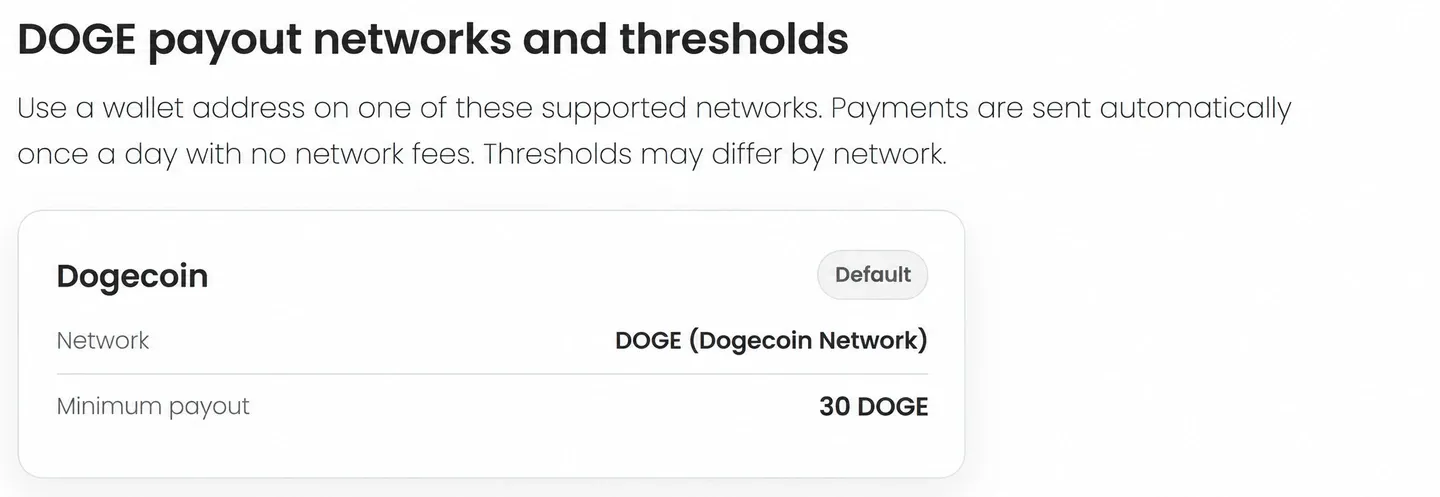
For a CPU or GPU owner, conversion can be a way to receive DOGE without buying a Scrypt ASIC. It also introduces the service's conversion and payment dependencies. Don't compare two algorithms' raw hashrates as if they measured the same work, or present a calculator's projected DOGE balance as a guaranteed return.
When comparing routes, record the same operating period and power cost, then account for both LTC and DOGE at a consistent valuation time. Include unpaid balances and eligible work still awaiting reward allocation. Avoid counting a combined fiat-income display and its component coin balances twice.
Trace a missing DOGE payment to its actual stage
If LTC is accruing but DOGE isn't, inspect DOGE address activation and the merged-reward page before changing the miner's server. If DOGE is credited but unpaid, check the balance against its own threshold, the payment schedule and any address-change hold. An LTC payout doesn't prove that the DOGE threshold has also been reached.
For a completed payment, match the recorded transaction to the correct Dogecoin address and check the recipient's crediting rules. On a hosted solo route, start with a different question: did your miner find an eligible block? SoloPool's own help says its block rewards are assigned directly and some exchanges may not support those coinbase transactions. Check wallet compatibility before using that route.
Set the receiving conditions first, connect one compatible worker, then verify the work and each coin's accounting before adding more equipment. The mining pool library covers other pool decisions, and the mining hub helps with the hardware and operating choices behind them.