Chain Bridge

Contents
Start an ASIC miner repair decision by saving the fault evidence and checking the external power, cooling and network conditions. A zero hashrate or missing board doesn't identify the failed component by itself. I'd keep owner checks outside the power supply and hashboard circuitry, then ask the manufacturer or a qualified repair service for a model-specific diagnosis and written quote before authorizing parts or shipping.
Stop operating a visibly damaged miner
Smoke, a burning smell, damaged power connectors, liquid exposure or repeated electrical trips are reasons to stop. Follow the installation's safe isolation procedure; if the disconnect or surrounding area is damaged, have the electrical supply made safe without approaching exposed conductors. Don't repeatedly reset a breaker or power the machine again to capture a better log.
Bitmain's PSU precautions prohibit connecting or disconnecting its power connectors while energized and warn against opening or repairing the PSU yourself. Switching off doesn't turn internal power-supply work into an owner-level check. For a hosted miner, ask the site's authorized staff to isolate and inspect it under their procedure.
These checks concern an assembled ASIC miner. A software setting can't correct a damaged connector, and a fan simulator can't establish that cooling is adequate. Don't bypass protection to keep a faulty unit hashing.
Save the identity and fault history before changing anything
Record the exact model and variant, serial number, firmware build, operating profile, PSU model and cooling arrangement. Note when the problem began, its timezone, whether it follows startup or warming up, and any preceding firmware, network, location or tuning change. Keep each machine's records separate.
When continued operation is safe, capture the status page and complete relevant logs before a reboot, reset or flash. Bitmain asks for the kernel log, miner status and overview screenshots when reviewing a malfunction. Include active boards, detected chips, temperatures, fan readings, uptime, pool connection and accepted work. A screenshot of the last error line alone can omit the sequence that led to it.
Don't erase settings as a generic first repair. I want one recorded symptom, one justified change and an observable result; changing the firmware, pool and power target together makes it difficult to tell what helped. If support requests a reset or approved firmware recovery, preserve the configuration and use the procedure for the exact controller and build.
Choose the branch that matches the symptom
Begin with what the miner and pool report. Bitmain's S19 zero-hashrate guidance separates temperature protection, fan failure, PSU abnormalities, network or pool errors, and hashboard faults. That distinction is useful; its error codes and internal cable instructions aren't a universal procedure for every ASIC.
| What you observe | External check and next action | What establishes progress |
|---|---|---|
| No dashboard or signs of startup | Check the documented startup sequence, permitted supply and external connections without opening the unit. Have an electrician or site operator resolve uncertain supply or circuit faults. Don't substitute a PSU because its plug fits. | The correct supply is confirmed and the normal startup sequence returns; otherwise preserve the symptom for service. |
| Dashboard works, but pool work is absent | Check the intended pool, account or worker, authorization errors and network path. Compare the pool's reporting window with the device's uptime before assuming lost hardware. | The intended worker records recent accepted work. A local hashrate alone doesn't establish pool credit. |
| Temperature protection or abnormal fan status | Inspect the external airflow path for obstruction and recirculation. Compare readings with the exact model's limits. Stop for a persistent fan or temperature fault; request the approved service procedure. | Protection faults clear and readings stay within the specified conditions, with cooling intact and accepted work continuing. |
| A board is missing or chip detection fails | Save board counts and the complete startup log. Confirm that the model and firmware match. Ask service to assess the board, power and control path; don't infer a particular dead chip from a summary counter. | All expected boards and chips are detected under the approved configuration, then verified through sustained operation. |
| Intermittent resets or failure after a change | Save historical logs and the change timeline. If safe and documented, return the changed setting to its previous supported state. Persistent resets, electrical trips or lost boards require service. | The recurring symptom stops under comparable conditions; a successful reboot alone isn't enough. |
Focus the table and scroll sideways to read the checks and expected result.
Internal connector reseating, board swapping, bench voltage measurements, soldering and chip replacement need the appropriate service procedure, training and equipment. A repair-tool catalog doesn't establish that a particular test fixture or rework method is compatible with your board. Keep the miner unpowered while awaiting instructions if safe operation hasn't been established.
Export current and historical logs for the service
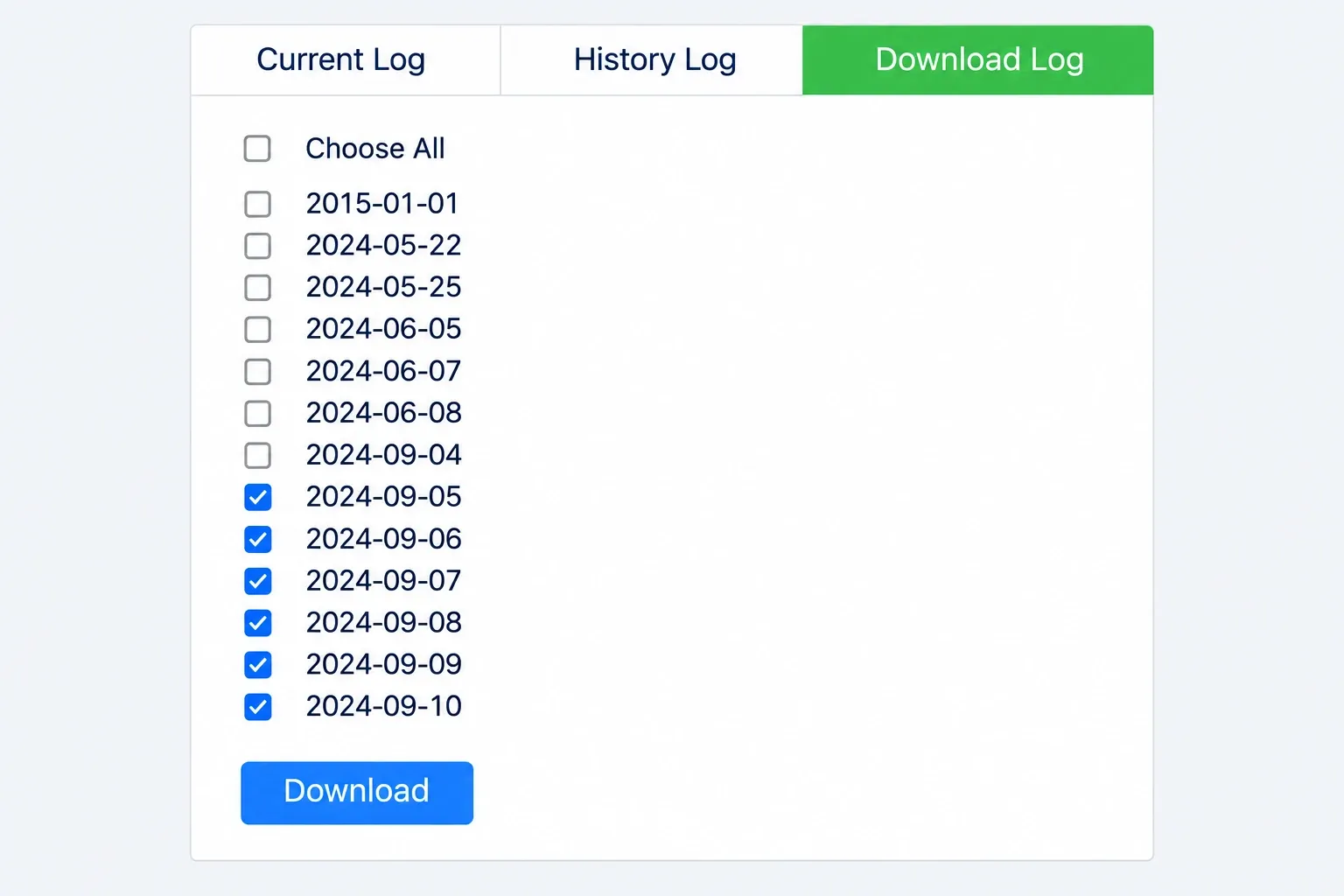
Use the route shown by your installed interface. Bitmain's newer log instructions use Miner Log, then Current Log, History Log or Download Log. Current Log covers the present fault; historical records can help with intermittent behavior. An older interface instead places Kernel Log under System, so follow the controls that belong to your release.
Copy the complete relevant log into a text file and check that the beginning and end survived. Where Download Log is available, select the dates covering the incident and download the archive. Keep the original privately, then make a separate copy with passwords, tokens and unrelated account details removed before sharing. Supply the unit's serial number through the service's verified private intake channel.
Keep the fault description beside the files: what failed, what still works, the first occurrence, whether it repeats, and the result of each external check. A technician can compare that sequence with the startup and historical records without guessing which machine or incident the attachment describes.
Confirm coverage and what the service wants shipped
Check the manufacturer's warranty or seller's contract using the actual serial number, purchase records and repair history. Bitmain makes its warranty period subject to the sales contract. Don't assume that a generic warranty duration, a technician's certification claim or an old service address establishes coverage for your unit.
Get written confirmation of eligibility, the authorized repair location, the required contents and the deadline for dispatch and receipt. Bitmain's warranty and repair-ticket instructions describe different timing conditions; confirm the applicable requirement before booking transport. Creating a ticket alone doesn't settle whether the received shipment will qualify.
Ask whether the complete miner or an individual part is required. Bitmain recommends the whole machine because a repaired board passing its own test doesn't guarantee normal operation after reinstallation. Board compatibility, other faults and the original parts' identity still matter. Don't mix boards or dismantle a covered miner merely to reduce shipping cost.
Approve a diagnosis and cost ceiling
I'd choose a service that names the supported model and board revision, explains the proposed work and returns useful test records. Ask whether it repairs components, replaces boards or supplies an exchange unit; establish what happens to the original parts and serial numbers. A broad claim to repair every ASIC isn't evidence of a successful repair on your hardware.
Separate the intake estimate from the amount you authorize. Viperatech's published process revises the quote after diagnosis and requires approval for changes; it also describes inspection costs when work isn't approved. Those are provider-specific terms to clarify in your own offer, rather than a universal repair policy.
Get the diagnostic fee, labor, parts, both shipping legs, taxes or customs, insurance, storage charges and any no-fix or return-unrepaired fee in writing. Set a spending limit that requires renewed approval if exceeded. Ask when the turnaround clock starts, whether parts delays are included, what testing is performed and what the repair warranty covers.
For example, Simple Mining says it supplies logged mining stress-test results before return. Request the equivalent evidence for your machine: identity, firmware and profile, active boards, temperatures, work output, interruptions and test conditions. A vendor's advertised test duration or warranty doesn't establish an industry-wide acceptance standard or a guaranteed completion date.
Compare the full repair cost with a suitable replacement and the unit's expected remaining operating margin. Account for downtime and the risk that diagnosis finds additional damage. There's no reliable universal price per missing chip or payback period; the fault, hardware revision, parts and shipping change the decision.
Protect the shipment and verify the returned miner
Obtain the service's shipping instructions before packing. Bitmain's packaging guidance calls for model-matched protective packaging and cushioning, with separated protection for individual boards. Follow the approved method for the contents you're sending. Photograph the condition, serial labels and packed unit, retain tracking and record exactly which accessories or parts are included.
Never include a wallet seed phrase, private key or unrelated account credential. If diagnostic access is requested, agree on a limited method through the verified service channel and revoke temporary access afterward. Don't expose the miner's administration interface to the internet to make remote support convenient.
On return, compare the machine and parts with the agreed repair scope before energizing it. Stop for shipping damage. Read the repair report, confirm firmware, pool destination and operating settings, then use the model's normal startup procedure under the correct power and cooling conditions.
Check expected boards and chips, protection and fan behavior, temperatures, restarts and recent accepted work at your intended pool. Compare a suitable observation period with the service's stated test conditions and your earlier stable record. If the original fault returns, keep the new logs and report it under the agreed repair terms instead of immediately reflashing or opening the unit.
Once the miner is stable, keep the accepted configuration and repair records together. The mining library provides the next route for ongoing monitoring, pool accounting or operating-cost decisions.