Chain Bridge

Contents
Use getblock "BLOCK_HASH" 2 to read a Bitcoin block with its transactions expanded, then inspect each transaction's vout[].scriptPubKey. The address field is optional: a missing address can be the correct result for the script. I'd start with verbosity 2 for output analysis and use 3 when you need the previous outputs spent by the inputs.
This walkthrough uses Bitcoin Core's 32-series RPC format and Core 32.1's field behavior. You need an existing node on the intended Bitcoin network and the block data available locally. If you still need to install and synchronize one, start with running your own Bitcoin node.
Choose the data you need
The Core getblock reference defines four documented verbosity levels. Choose one explicitly so the shape of tx doesn't depend on an omitted argument.
| Verbosity | What comes back | When I'd use it |
|---|---|---|
| 0 | Serialized block as a hex string | You need the raw block bytes. |
| 1, the default | Block information; tx contains transaction IDs | You need block metadata or a list of transactions. |
| 2 | Block information; tx contains transaction objects | You need output amounts and scripts, or transaction inputs. |
| 3 | Expanded transactions with input prevout information where undo data is available | You need the amounts and scripts of outputs those inputs spent. |
Verbosity 1 isn't just a block header. In this version it also includes size information and coinbase_tx metadata. Conversely, verbosity 2 doesn't make every input's previous script available. Core documents the prevout-rich result for unpruned blocks in the current best chain.
Keep the software straight when searching for examples. Bitcoin Cash Node and Zcash implementations have their own RPC behavior. Extra parameters from their documentation aren't instructions for Bitcoin Core.
Read a block from your node
getblock takes a block hash, not a height. If you have a height, getblockhash resolves it in your node's best chain. These are documented command examples; BLOCK_HASH means the hash you obtain, without the placeholder text.
bitcoin-cli getblockhash 1000
bitcoin-cli getblock "BLOCK_HASH" 2
The first command asks for the hash at height 1000. Copy that returned hash into the second command. Use the same node configuration and network for both. An out-of-range height fails; a hash from a different network won't identify the block you intended.
In Bitcoin Core's GUI Console tab, omit the bitcoin-cli prefix. Enter help getblock to read the help supplied by your installed version, then use getblock "BLOCK_HASH" 2. This is a read operation; it doesn't require unlocking a wallet. Read any command before entering it, especially one supplied by a stranger.
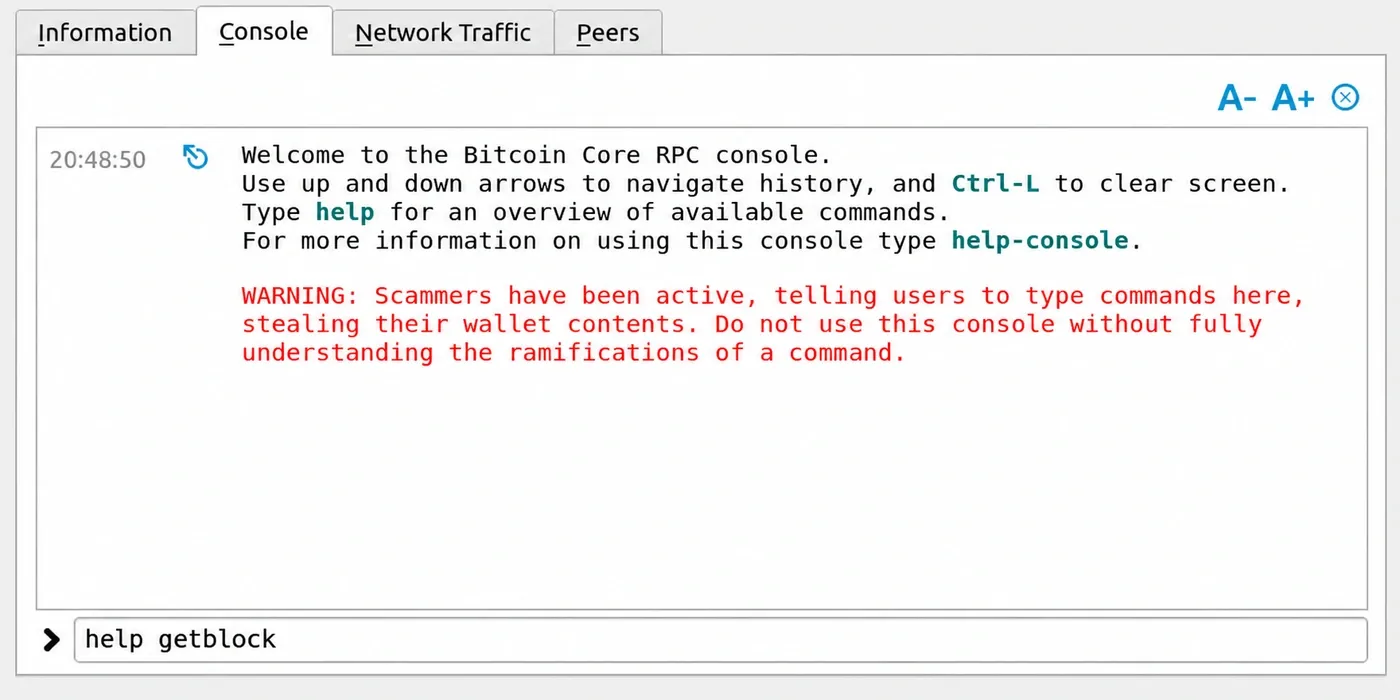
help getblock in the console without a bitcoin-cli prefix. The command shown is still in the input field.Check the returned block's hash, height and confirmations before interpreting its transactions. A confirmations value of -1 means the block isn't on the main chain. A saved block's contents and its current chain status are different things.
You don't need txindex just to expand transactions in an available block with getblock. Don't confuse that with looking up an arbitrary transaction with getrawtransaction: a confirmed transaction lookup without a supplied block hash depends on the transaction index. With a known block hash, that RPC can look in the specified available block.
Follow the transaction's output fields
At verbosity 2, open an object in the block's tx array, then its vout array. Each output records an amount and the script that controls spending it. The Core transaction serializer writes these fields directly from the transaction.
| Field | Read it as | Avoid this mistake |
|---|---|---|
tx[].txid | The transaction ID | Don't substitute the block hash or the transaction's witness hash. |
tx[].vout[].n | The output's zero-based index | This identifies an output within that transaction, not a position in the block. |
vout[].value | The output amount in BTC | Don't interpret the number as satoshis or use binary floating-point rounding for accounting. |
scriptPubKey.hex | The actual output script bytes, hex-encoded | Keep this even when there's no address. |
scriptPubKey.asm | A disassembly of the script | It isn't a receiver identity. |
scriptPubKey.desc | An inferred output descriptor | It isn't evidence that your wallet owns the output. |
scriptPubKey.type | Core's classification of the script | Don't assume every type has an address. |
scriptPubKey.address | An address when Core can report a well-defined one | Don't make this a required field in every output. |
There are also two different uses of hash. The block-level field identifies the block. Inside an expanded transaction, hash is its witness transaction ID, or wtxid; txid is the non-witness transaction ID. They can differ for transactions with witness data. Use the transaction's txid plus the output's n to identify an outpoint.
For analysis, I'd retain the outpoint, exact amount, script hex and script type, with the address as an optional convenience. That keeps addressless outputs in your data. Preserve exact decimal amounts when parsing BTC values; rounding an amount before converting units can change the accounting.
Scripts without an address
An address is a way of communicating certain payment scripts. It isn't a field embedded in every transaction output. Core's ScriptToUniv implementation reports an address only when destination extraction succeeds and the script isn't classified as pubkey.
For example, pubkey means a pay-to-public-key, or P2PK, script. It can be a valid output while having no address field. The same absence is expected for bare multisig, nulldata and nonstandard scripts under Core's destination-extraction rules. This is about the script, not simply whether the transaction is old.
Don't hash a P2PK public key into a P2PKH address and silently treat that as the original output's payment address. Pieter Wuille's explanation of address labels used by explorers distinguishes that historical public-key label from an address encoding the actual payment script. Sending to the derived P2PKH address creates a different script.
Older examples may use an addresses array. The current format here uses the singular, optional address field; don't mistake an old parser's expected field name for missing blockchain data.
If an explorer displays an address where Core doesn't, compare the actual scriptPubKey.hex and the explorer's labeling rules. I wouldn't alter the script or invent a destination just to make both displays look alike. Nor should an address label become a claim about the person who controls an output.
Use verbosity 3 for the outputs an input spent
A normal transaction input's vin[].txid and vin[].vout point back to an earlier transaction output. They don't describe one of the new outputs in the same transaction. Verbosity 2 shows those references; it doesn't include the previous output's script merely because it expands the transaction.
bitcoin-cli getblock "BLOCK_HASH" 3Where the required undo information is available, look under tx[].vin[].prevout. Its value is in BTC, scriptPubKey describes the spent output, height records its height, and generated says whether that previous output came from a coinbase transaction. The address inside this previous script is still optional.
Coinbase is the exception. A coinbase input uses coinbase rather than a normal previous-transaction outpoint. Core doesn't attach ordinary input prevouts or a transaction fee to it through this undo-data path. Don't count the block's coinbase output value as a transaction fee.
For other transactions, fee can appear at verbosity 2 as well as 3. Core derives it from input amounts minus output amounts when undo data is available. An omitted fee is missing information, not a zero fee. The same principle applies to absent prevout: increasing verbosity doesn't recreate data the node lacks.
If a block or field is missing
Start with the error or the exact missing field. The block-availability checks distinguish a hash the node doesn't know from block bytes it can't supply.
Block not found: confirm the hash, Bitcoin network and node. If you began with a height, resolve it on this node rather than copying a hash from a different chain.Block not available (not fully downloaded): the node knows about the block but lacks the full block data. Check synchronization before treating this as a parsing failure.Block not available (pruned data): the historical block data was pruned. Use a trusted node that retains the needed block; raising verbosity won't recover deleted bytes.addressalone is absent: inspectscriptPubKey.typeand keep the script hex. This can be a complete, correct response.feeorprevoutis absent: check verbosity, the coinbase exception and undo-data availability. Don't substitute zeros or an empty payment destination.
A disk-read or expected-undo-data error is a separate storage problem. Preserve the error and relevant logs for diagnosis; don't begin by deleting chainstate or enabling an index that doesn't restore the missing block. For a useful report, record your Core version, network, requested hash, verbosity and exact error, with credentials removed.
A historical output isn't necessarily unspent now
getblock describes what a block contains. It doesn't remove an output from that history when a later transaction spends it. To inspect the current unspent-output view, use gettxout for that transaction ID and output index.
bitcoin-cli gettxout "TXID" N trueReplace TXID with the transaction's txid and N with its output's n. The final true includes the node's mempool, which is also the default: an output spent by a mempool transaction won't appear. Use false only when you deliberately want the chain UTXO view without those mempool changes.
A null result means the UTXO wasn't found in the requested view on that node. It doesn't by itself prove a confirmed spend: check the outpoint, network, synchronization and mempool choice. Keep this current-state check separate from the block data you saved for historical analysis. The Bitcoin node guides cover the surrounding node work when you need to investigate the underlying setup.